

Metrivra
$329.00
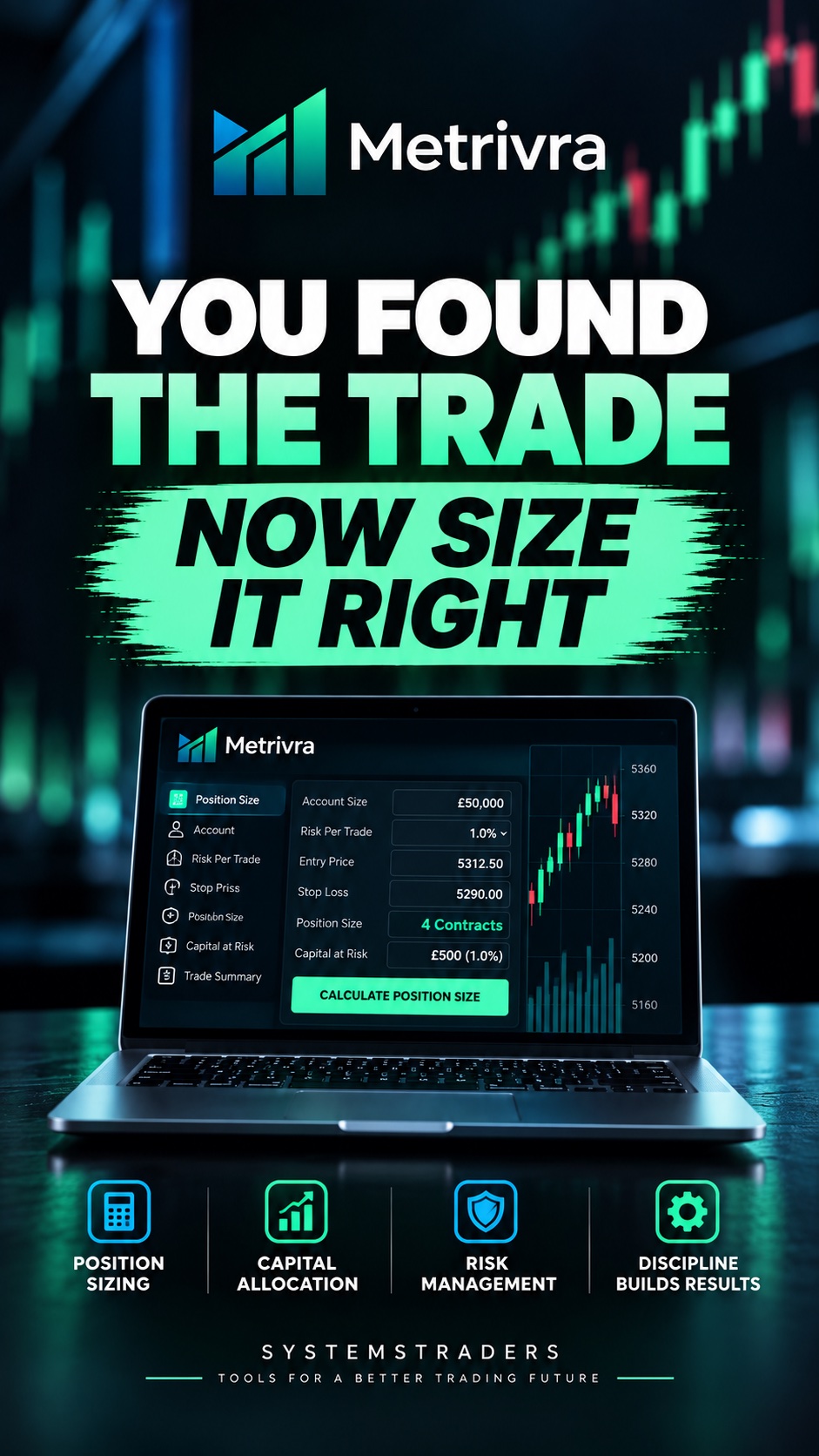
Metrivra is a Windows desktop app that works out how big a position should be, measured against your account, your costs and your own risk limits. Choose one of seven mechanical sizing methods, enter your entry and stop, and it gives you the exact size before you place the trade.
It runs on your PC, never connects to your broker and never places an order. Your records stay in an encrypted database on your own computer.
Lifetime licence, one payment
One computer at a time. Your licence key arrives by email.
Every trade, measured.
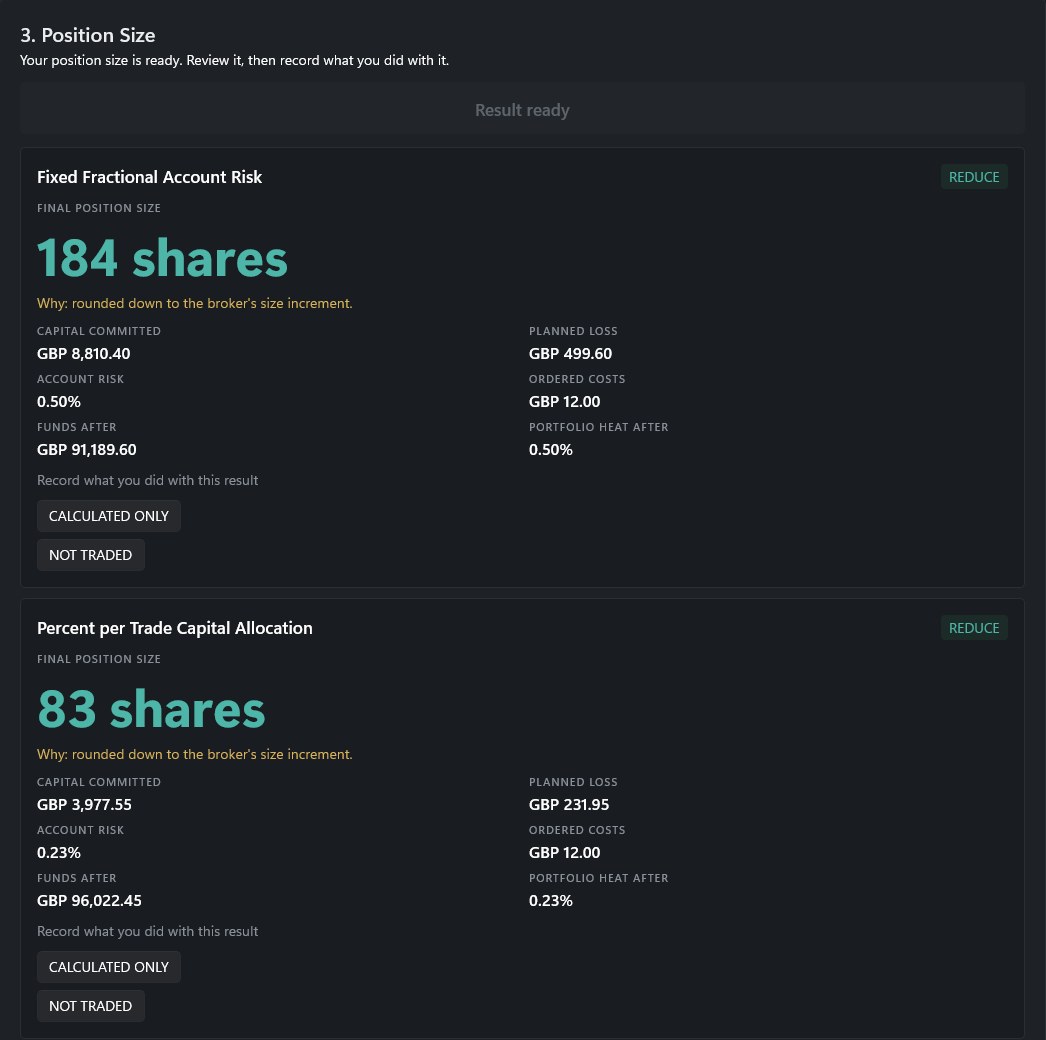
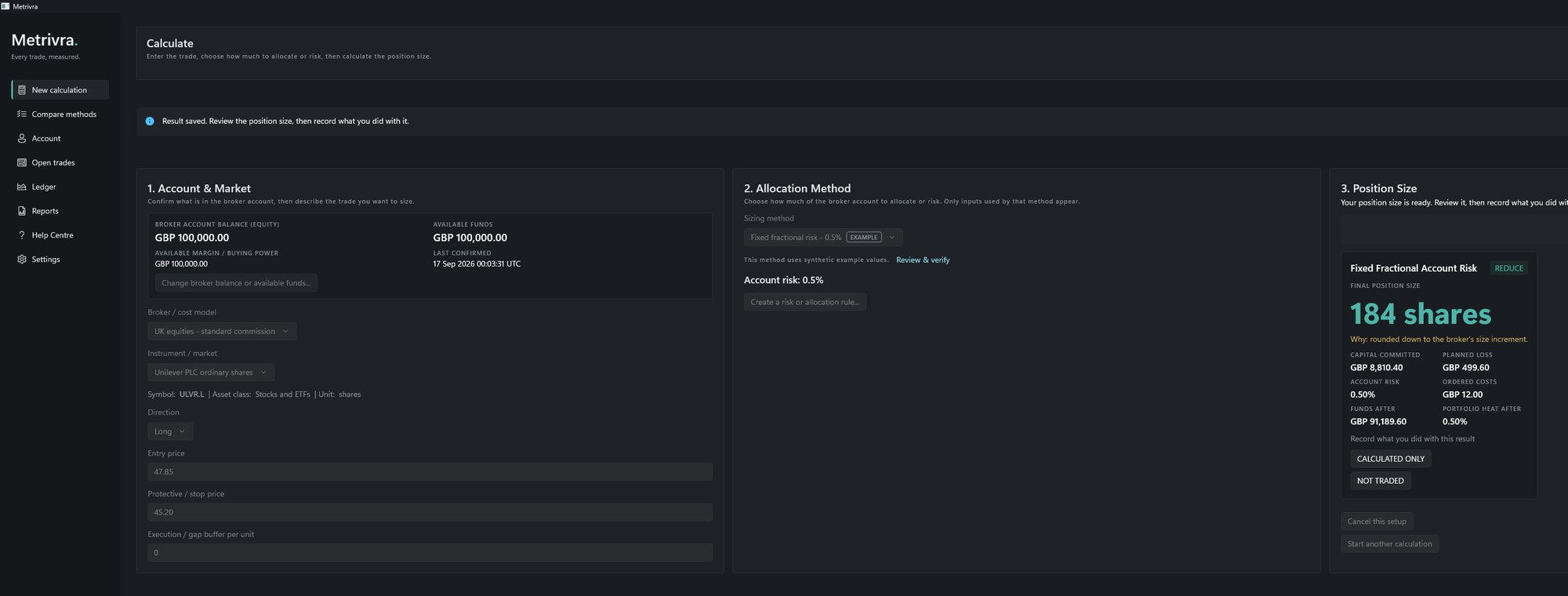
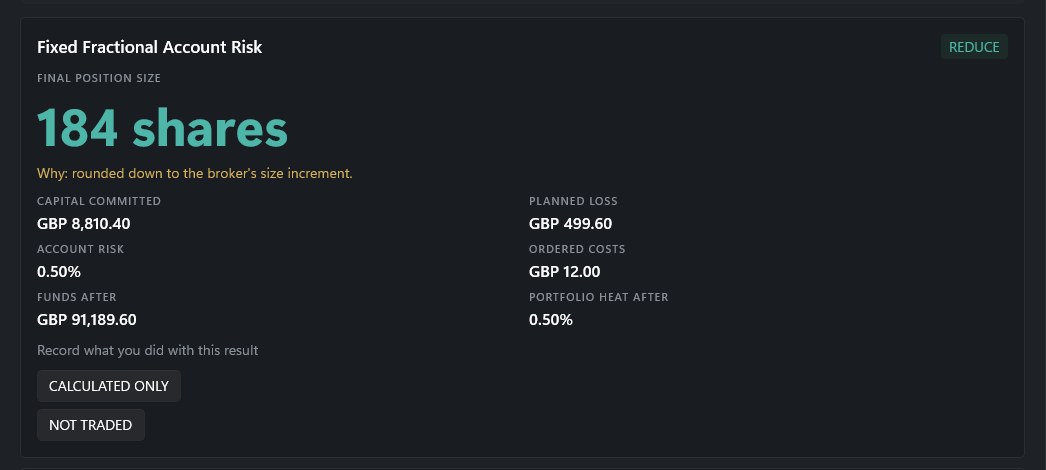
Metrivra is position sizing and capital allocation software for Windows. Enter the broker, instrument, entry and stop, choose a sizing method, and confirm the balance you're trading from. Metrivra returns the exact size, with capital committed, planned loss, costs and portfolio heat after the trade, before you place it.
Same trades. Different size. Different outcome.
Entries decide whether a trade wins. Size decides what it does to your account.
Most trading effort goes into the setup, the signal and the timing. But the size of each position decides how much a winner adds, how far a drawdown runs, and whether there's still cash for the next signal. It's the question nobody teaches you to answer: how much?
SystemsTraders' RTMX allocation studies make the point. One RTMX trade stream was run through different sizing rules: same trades, same dates, same exits. Only the sizing changed.
- S&P 500 universe, identical trades: $63,103 under the worst sizing rule tested, $114,594 under the best, each starting from $50,000.
- S&P 100 universe, the same trades: $57,883 at 2% of equity per trade, $71,725 at 7%.
- The $114,594 result came with a 33.98% portfolio drawdown.
- At 5% of equity on the S&P 500, only 5,055 of 9,630 signals could be funded.
Caveat: Mechanically applied allocation examples, not recommendations. $50,000 starting account, one shared-capital portfolio. Drawdown is portfolio drawdown. The universes ran over different trade windows, so read each result on its own, not against the others. These are hypothetical results from historical testing, not the record of any real account. Past testing is not a forecast.
What Metrivra does
- Sizes the trade to your rules. The exact size in shares, units, contracts or £ per point, with capital committed and planned loss beside it.
- Runs methods side by side. Ask several sizing methods about one trade and compare the answers before you commit. Metrivra never picks one for you.
- Counts costs first. Commissions, taxes, spread and slippage buffers come out before the size is set, so the planned loss already includes them.
- Holds your limits. Caps on position size, portfolio exposure, open risk, leverage and open positions. If a size would break one, Metrivra cuts it back and names the rule that moved it.
- Records what you did. Mark each result as traded, not traded or calculated only. It all goes into an encrypted ledger, and seven built-in reports export it to PDF or CSV.
- Keeps it on your PC. No cloud sync, no telemetry, no broker logins.
How it works
- Set up your account. Pick a trader type to start from; it sets a starting balance and risk limits. Add your broker's costs and the instruments you trade. Everything stays editable.
- Enter the trade. Broker, instrument, long or short, entry and stop. Pick a sizing method, then confirm the balance you're actually trading from.
- Get the size, then record it. See the quantity with capital committed, planned loss, costs and portfolio heat after the trade, then record what you did with it.
Four ways to size the same trade
Metrivra has seven mechanical sizing methods. This is how they cover the four allocation families traders ask about most. You declare every input; Metrivra never optimises and never picks a winner.
Percentage of equity. In Metrivra: Percent per Trade Capital Allocation, and Fixed Fractional Account Risk. Every trade takes a fixed slice of the account as it stands today, so the size grows with the account and shrinks when it falls.
The math: Trade allocation = Current account equity × Allocation %
Fixed dollar. In Metrivra: Fixed Cash Risk. The same dollar amount at risk on every trade, however the account is doing. Metrivra fixes what you'd lose at your stop, not the amount you put in, so a wider stop means a smaller position.
The math: Position size = Fixed dollar risk ÷ Risk per unit (the distance from entry to stop, plus costs)
Equal weight. In Metrivra: Percent per Trade Capital Allocation, set to 100% ÷ your number of slots. Ten slots means 10% a position; set maximum open positions to ten as well, and Metrivra holds you to it.
The math: Trade allocation = Current account equity ÷ Position slots
Volatility-based. In Metrivra: ATR / Volatility Unit Sizing, Target Volatility Position Sizing, and Inverse Volatility Portfolio Allocation. Higher volatility, smaller position; lower volatility, larger position.
The math: Position size ∝ 1 ÷ Volatility
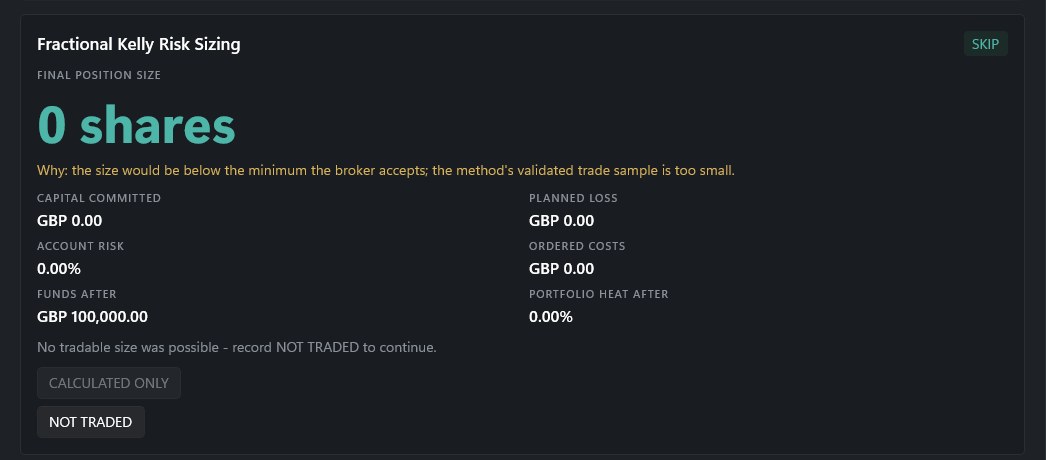
Also included: Fractional Kelly Risk Sizing, which won't size a trade until at least 100 validated closed trades back it up, and a dedicated UK spread-bet engine that sizes in £ per point.
What you get
- Windows installer (.zip containing the .exe), from the download link in your order email and in My Account under Downloads.
- Licence key for one computer at a time, in your order email as soon as your payment is confirmed. It starts with MTRV-.
- User guide built into the app: a Help Centre of more than 40 plain-English guides, plus a page for every sizing method with its maths and worked examples.
- Support from SystemsTraders: [email protected] or +44 330 133 2432, Monday to Friday, 09:00 to 18:00 GMT.
Metrivra never updates itself. New versions come as a fresh download, and your records are kept when you install one.
A note on the Windows warning
Metrivra is a new release and is not yet code-signed, so Windows will show a blue "Windows protected your PC" screen the first time you run the installer, with "Publisher: Unknown publisher".
This is Windows saying it hasn't seen this file often enough yet - not that it found anything wrong. To continue, click More info, then Run anyway.
So you can confirm you have the genuine file, here is its fingerprint:
Metrivra-Setup-1.0.0.exe - SHA-256
e27793ea01ed5e351badfa8fda8af6af9f7c97c8ae57f7b591056afb4072b73c
To check it, unzip the download, open PowerShell in the folder where you unzipped it, and run:
Get-FileHash .Metrivra-Setup-1.0.0.exe
Metrivra installs for your user account only and does not need administrator rights. If the Microsoft .NET runtime it needs isn't already on your PC, the installer will offer to fetch it from Microsoft - that one step does ask for administrator permission, because that component is shared with other programs.
A code-signing certificate is on its way, and this warning will disappear once it's in place.
System requirements
- Windows 11, 64-bit
- 64-bit Intel or AMD processor (x64)
- Microsoft .NET 10 Runtime (x64), a free download from Microsoft
- 4 GB of memory or more (Metrivra itself uses about 200 to 350 MB)
- About 160 MB of disk space, plus room for your records
- A screen of 1366 × 768 or larger (the Metrivra window needs at least 1100 × 720 at 100% display scaling)
- An internet connection to activate, and now and then to re-check your licence; no live market data is needed
- Not available for macOS, Linux, iPhone, iPad or Android
Your records open only under the Windows account that created them, on that PC. Moving to a new PC? Make an encrypted backup in Metrivra and restore it there.
Licensing
One payment, not a subscription. Each purchase is one licence key for one computer at a time.
Enter your key the first time Metrivra opens. Activation needs an internet connection and sends your key and a hashed device fingerprint; no personal data or trading records. After that, Metrivra works offline and re-checks quietly when you're online.
You can reinstall, or replace a drive, on the same computer as often as you like. You can move your licence to a new computer yourself once a year, and the old one is switched off. To run Metrivra on a second computer at the same time, you need a second licence.
Frequently asked questions
Does Metrivra tell me what to trade or which method to use?
No. There are no signals, no recommendations and no automatic method choice. You declare the rules: the method, your risk, your limits and your costs. Metrivra calculates under them and shows its working.
Does it connect to my broker or place orders?
No. Metrivra never connects to a broker, never asks for broker passwords or API keys, and never places an order. It works out the size; you place the trade with your broker.
Which markets can it size?
Stocks and ETFs, spot forex, exchange-traded futures, and UK spread bets through a dedicated £-per-point engine (spread bets need a GBP account). You enter your own broker costs and contract details, and prices quoted in another currency are converted at the exchange rate you enter.
Can I use it on more than one computer?
One computer at a time. You can move your licence to a new computer yourself once a year, and the old one is switched off. To run Metrivra on two computers at the same time, you need two licences.
Does it run on Windows 10 or a Mac?
Metrivra is built for 64-bit Windows and has been tested on Windows 11. It isn't available for macOS. If you're on Windows 10, email us before you buy.
Where is my data kept?
In one encrypted database on your own computer, protected by your Windows account. Nothing is uploaded: there's no telemetry and no cloud sync. Activation sends your key and a hashed device fingerprint; no personal data or trading records. You can make a password-protected backup file whenever you like.
How do I get Metrivra after I buy?
As soon as your payment is confirmed, your order email brings your licence key and a link to download the Windows installer. Both are also in My Account on systemstraders.com. Install Metrivra, open it, and enter your key.
Can I get a refund?
Metrivra is a digital download, so as our Terms and Conditions explain, we don't normally offer refunds once it's been purchased and delivered. If it doesn't work on your PC, contact us and we'll review it case by case.
Risk warning
Trading stocks, ETFs, forex, futures and spread bets carries a high level of risk, and you can lose money quickly. Leveraged products, including forex, futures and spread bets, can lose more than your initial deposit. Only trade with money you can afford to lose.
Metrivra is calculation and record-keeping software. It does not give investment advice, recommendations or trade signals, does not judge whether a method or trade is suitable for you, and does not connect to brokers or place orders. Every result is calculated from the rules and figures you enter. You are responsible for checking them against your broker's and instrument's current terms, and for your own trading decisions. A stop order does not cap your loss: gaps, slippage and fast markets can fill you beyond it.
The allocation-study figures on this page are mechanically applied allocation examples, not recommendations. They are hypothetical results from applying sizing rules to a historical RTMX trade stream in a $50,000 shared-capital account. They were not achieved by any real account, do not reflect real-world liquidity, slippage or the pressure of live trading, and have the benefit of hindsight. Past testing is not a forecast, and no representation is made that any account will achieve similar results or drawdowns. Screenshots of the app use example figures.
Nothing on this page is an offer or solicitation to buy or sell any financial instrument. Microsoft, Windows and .NET are trademarks of the Microsoft group of companies.